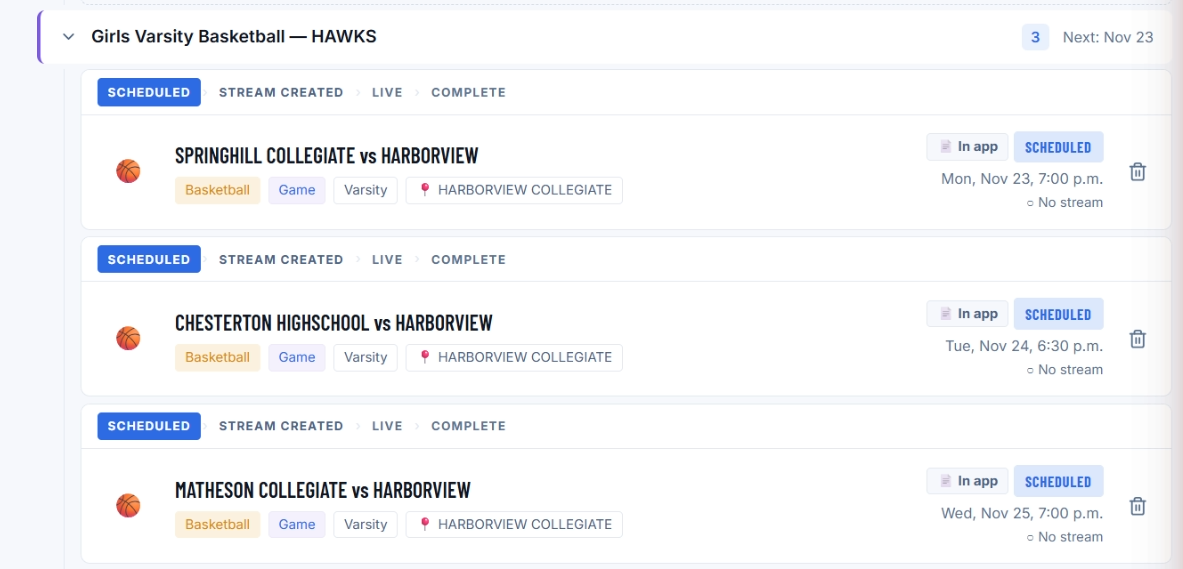
Broadcast Manager season schedule
Broadcast Manager · available now

Every game.
Streamed like a pro.
On autopilot.

Sports Autopilot broadcasts your team's whole season to YouTube — automatically. Set your schedule once; every game is created, branded, and goes live on its own.

no crew · no missed games · no credit card to start
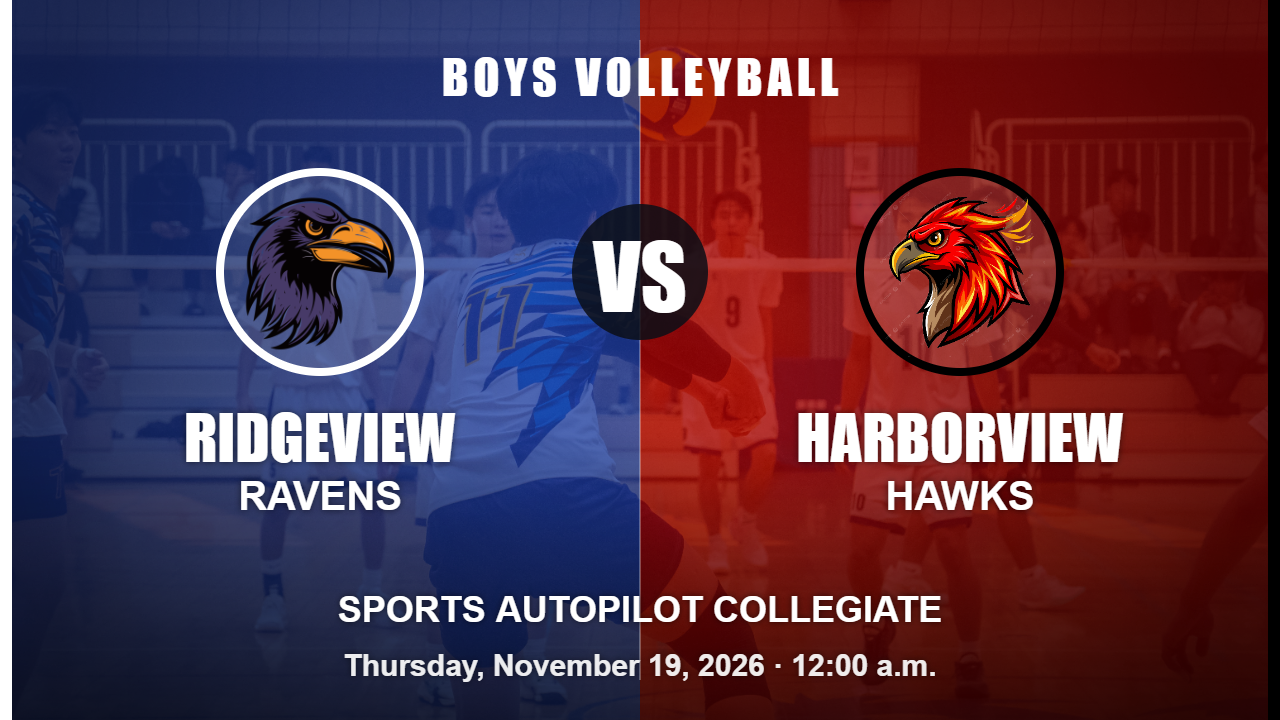
Auto-branded matchup thumbnail
Auto-branded thumbnails

A branded
thumbnail for
every matchup.

Head-to-head matchup art with both schools' logos and colors, generated automatically for every game. No designer, no editor, no last-minute scramble.

built from your team logos and colors
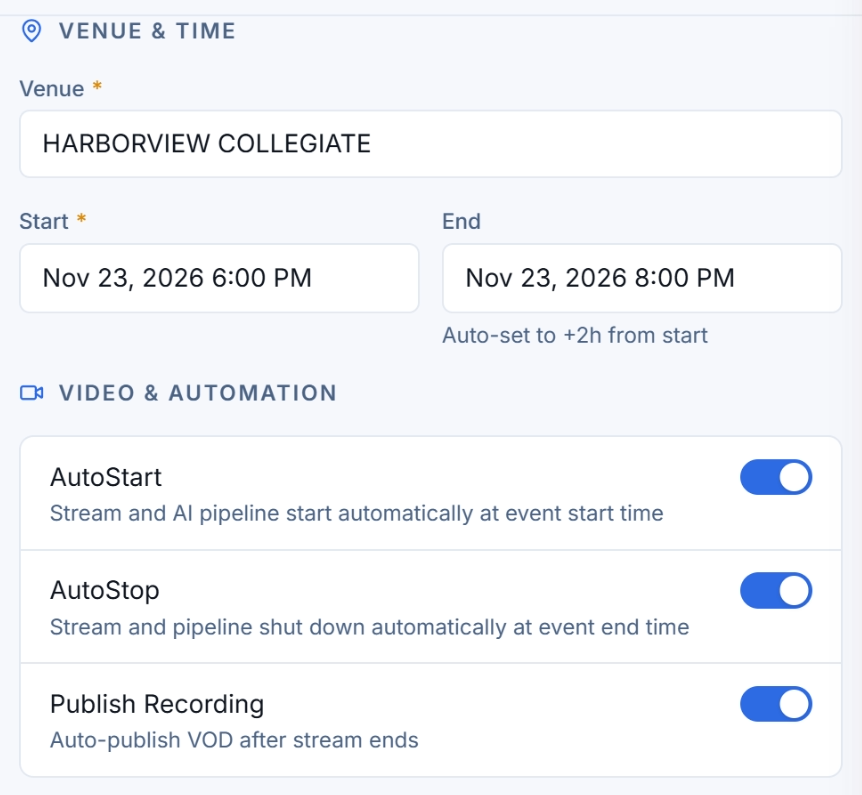
Auto start and stop controls
Auto start & stop

It goes live
on its own.
Then wraps up.

Streams start and stop at game time, and the recording publishes to your channel afterward. Nobody has to press a button — you just watch the game.

games start and end all on their own
01 / How it works

Set it once. It runs the season.

1
Connect your channel
Link the YouTube channel you already own. It stays yours — always. Optional: Sports Autopilot will offer fully hosted solutions for clients who have no YouTube channel — contact us for details.
2
Add your schedule
Enter games or import a CSV/Excel season in one upload.
3
Broadcasts create themselves
Every game becomes a scheduled YouTube broadcast — titled, timed, and given branded matchup art.
4
Games stream & archive
Streams go live and end on their own; the recording publishes to your channel.
02 / Before Sports Autopilot

The old way: streaming every game by hand.

Before Sports Autopilot, this was the routine — someone repeated this checklist by hand before every single game. Miss one step, and the stream never went live.

The old game-day routine
Every step by hand
Create the broadcast & write the title
Match-ups, dates, and teams, typed out one game at a time.
Design the thumbnail
Both logos, team colors, and layout, built by hand in an editor.
Hit start, then stop
Someone courtside on time, watching the clock instead of the game.
Publish the recording
Make the VOD public so parents and players can find it later.
Now do it all again for the next game. And the next. All season.
With Sports Autopilot, every step on this list happens automatically.
03 / Features

Your broadcast crew, automated.

Automatic broadcast creation
Every game on your schedule becomes a scheduled YouTube live broadcast — right channel, right local time.
Branded matchup thumbnails
Home-vs-away art generated from each school's logo and colors. Every game looks like a broadcast.
Auto start / auto stop
Streams go live and end on their own at game time. The recording publishes to your channel afterward.
Broadcast company ready
Built for broadcast companies: run your whole client roster from one account, with every school and club streaming to its own YouTube channel.
You own your channel
You connect your own YouTube channel; we create broadcasts on it on your behalf. We never take ownership.
Optional: Sports Autopilot will offer fully hosted solutions for clients who have no YouTube channel — contact us for details.
Season imports
Upload a CSV or Excel schedule and your whole season is in — teams and schools matched automatically.
04 / Who it's for

Built for everyone who streams the game.

High schools & universities
Stream every sport, every level — without pulling staff or AV students off the game.
Sports clubs
Give every squad — 13U to 18U — polished coverage parents can actually find.
Broadcast companies
Run unlimited schools from one account, each on its own channel. Cover more venues without adding crew for every stream.
Roadmap · coming soon

One platform. More modules on the way.

Broadcast Manager is our first module — available today. These are next. Each will be priced as its own module when it ships; none are available yet.

Click any card to see what it does
Scoreboard OCR
Coming very soon
Scoreboard OCR
Reads your venue’s physical scoreboard through the camera, turning score and clock into live data for your broadcast.
Auto Director
Coming very soon
Auto Director
Cuts between your cameras automatically to follow the action — like a control-room director, without the control room.
Auto Instant Replay
Coming very soon
Auto Instant Replay
Detects key plays as they happen and rolls instant replays into the live stream automatically.
Auto Statistics
Coming soon
Auto Statistics
Builds player and team statistics from the broadcast automatically — no stat keeper on the bench.
Player Highlight Reels
Coming soon
Player Highlight Reels
Players sign up, and every game-changing play they make is clipped automatically into a personal highlight reel — ready to send to university and college scouting departments, or to review for ongoing training.
Auto Camera Operator
Coming soon
Auto Camera Operator
Pans and zooms to follow the play on its own — full-game coverage with no one behind the camera.
05 / Pricing

Broadcast Manager — our first module.

Simple annual pricing. Start free — no payment to begin. We email an annual invoice; your account activates when payment is received.

Single Team
One school, one team.
$500/year
Automatic broadcast creation
Branded matchup thumbnails
Auto start / stop & archiving
Start free trial
Most popular
School / Club
One school or club, unlimited teams.
$1,000/year
Everything in Single Team
Unlimited teams & sports
Season CSV / Excel imports
Start free trial
Broadcast Company
Unlimited schools, unlimited teams.
$2,500/year
Everything in School / Club
Unlimited schools & clubs
Each on its own YouTube channel
Start free trial

More modules coming soon — each priced separately. Full pricing details →

06 / FAQ

Common questions.

How does it work?

Connect your YouTube channel → add or import your schedule → broadcasts are created automatically → games start, stop, and archive themselves.

Do I keep ownership of my channel?

Yes — always. You connect your own channel; we create broadcasts on it on your behalf and you can disconnect anytime. Optional: Sports Autopilot will offer fully hosted solutions for clients who have no YouTube channel — contact us for details.

What do I need at the game?

Your existing camera/encoder setup pointed at the stream — Sports Autopilot handles everything on the YouTube side.

Do thumbnails really make themselves?

Yes — matchup art generated from each school's logo and colors, per game.

Can I import a season?

CSV/Excel import with automatic team and school matching.

Go live on autopilot.

Import your schedule. We'll take it from there, all season.

Start free trialExplore features →